Easier, faster, more precise – discover how using the item Engineeringtool reduces the time you spend on designing your constructions by up to 94%.
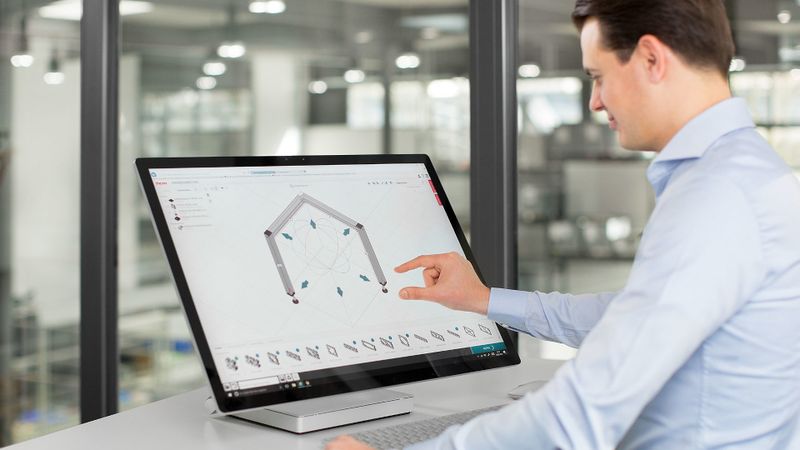
Engineering with aluminium profiles really can be this easy – the item Engineeringtool and its smart functions help you save valuable time.
(Source: item)
When it comes to standardised engineering tasks using aluminium profiles, such as designing factory equipment or racks, CAD programs are often overkill. What’s more, they lack specialist know-how about aluminium profile fasteners and accessories.
The free item Engineeringtool has been developed specifically as design software for use with aluminium profiles. It is based on decades of experience at item Industrietechnik and provides an intuitive, rules-based 3D engineering tool. Thanks to automatic links and filters, you can put together standard designs much faster than when using a CAD system.
Users of the item Engineeringtool have access to the item Building Kit System, the Lean Production Building Kit System and the item Work Bench System. More products are being added all the time. The software is free to use, runs directly in your browser so there’s no need to install anything, and does not require any additional programs.
Would you like to find out more about the item Engineeringtool or get some advice? You can find everything you need here:
All the functions in the item Engineeringtool are designed specifically to be user-friendly. The focus is on supporting users. This is clear from the product catalogue, which has numerous filters so you can find the products you need for your project fast.
Practical calculation tools ensure your designs aren’t oversized or undersized. When working with aluminium profiles, for example, aspects such as contour, groove shape, groove type, product line, design, length, deflection and buckling are all taken into account. This means you don’t need to know exactly which profile you need in advance. The item Engineeringtool takes your specifications and automatically works out which profiles are suitable for the stated requirements.
How do you go about designing constructions with aluminium profiles in the item software?
It is exceptionally easy to design structures with aluminium profiles in the item software. All you need to do is select products from the catalogue and drag and drop them onto the 3D work area.
Any errors in your design are flagged up immediately – the item Engineeringtool displays a corresponding message and actively helps you put things right. You can then order your faultless end result in the item Online Shop.
Products can be configured with just a few clicks in the “Features” window. Aspects such as the length of a profile can be adjusted via parameters, either by typing in the dimensions you want or using a slider.
How much time does the item Engineeringtool save?
Time savings are a key advantage of the item Engineeringtool: It helps you complete standard tasks up to 94% faster than when using a CAD system.
The extent to which the design software for aluminium profiles reduces user workload is particularly clear when it comes to fastening technology. All you need to do, for example, is drag a Standard-Fastening Set onto a Line 5 profile. The software automatically recognises the aluminium profile and selects the appropriate Line 5 Standard-Fastening Set. That includes incorporating the required thread and connection machining.
This process can be made even easier by using the “Preferred fastener” window, where you can choose between Automatic-, Standard- and Universal-Fastening Sets as your default option. After selection and placement, the engineering software automatically connects the aluminium profiles together.
Caps are also added automatically. Once these have been selected in the product catalogue and dragged to the profile ends, the software automatically adds the appropriate Caps. The same applies to floor elements such as Swivel Castors. Screws and other fastening materials do not need to be specified separately – the item Engineeringtool also incorporates these small parts automatically.
What are item sample solutions?
item sample solutions are application examples that you can use as inspiration and a starting point for your own projects. Because they include complete CAD data and parts lists, they can be adopted exactly as they are. Alternatively, you can adapt sample solutions to suit your own specific requirements. This is particularly easy to do in the item Engineeringtool. Sample solutions that can be opened in the item Engineeringtool are labelled accordingly.
Would you like to explore the full range of applications covered by item sample solutions? Click here for an overview:
Can repetitive tasks be shortened in the online design program that item offers?
Yes, repetitive tasks can be shortened in the item Engineeringtool. Components can be selected and duplicated with a double click. This means you can create basic frames in no time at all. If you want to make precise adjustments, you can use your keyboard to enter values for length. These are then fixed via a locking function.
How does the aluminium profile engineering software help with documentation?
The item Engineeringtool gives you very targeted support with documentation, which is generated automatically in no time at all. Putting together this documentation manually would take up to two hours, so you gain more time for tasks that add value.
There are three options to choose between when generating documentation – compact, detailed and fully comprehensive. The following are just some examples of the elements that can be included in documentation:
Parts list
Detailed machining plan
Multiview projection
Isometric view with complete dimensions
Exploded view
Assembly guide
Each design you add to your cart is also given a globally unique article number.
Does the item Engineeringtool make it easier to work as a team?
Yes, the item Engineeringtool makes collaboration much easier – primarily thanks to the article number. Every Engineeringtool project that you add to your cart gets its own article number. All you have to do is share this number with other people working on your project.
If they enter this number in the Projectviewer, they’ll be able to see the construction and all relevant information, which makes coordination work much more straightforward.
Can the item Engineeringtool assist with assembly?
Yes, the item Engineeringtool helps with assembly. Some fasteners have certain special features that mean they need to be fitted in a specific order. The innovative 3D assembly guide provides a step-by-step animation of the assembly process. This means fitters don’t need to have a detailed understanding of all the components.
What are the key benefits of the item Engineeringtool?
The item Engineeringtool offers the following key advantages:
End-to-end digital process chain: Everything in one seamless workflow – from design and documentation to ordering and assisting with assembly.
Error prevention: Intelligent automated processes ensure designs are safe and realistic.
Time savings: Significantly shorter lead times for engineering projects.
Easy ordering: Direct link to the item Online Shop for quick and easy ordering.
Fast availability: Machined profiles and components are available quickly. This means that designs can be built and put to use in good time.
Date: 08.12.2025
Naturally, we always handle your personal data responsibly. Any personal data we receive from you is processed in accordance with applicable data protection legislation. For detailed information please see our privacy policy.
Consent to the use of data for promotional purposes
I hereby consent to Vogel Communications Group GmbH & Co. KG, Max-Planck-Str. 7-9, 97082 Würzburg including any affiliated companies according to §§ 15 et seq. AktG (hereafter: Vogel Communications Group) using my e-mail address to send editorial newsletters. A list of all affiliated companies can be found here
Newsletter content may include all products and services of any companies mentioned above, including for example specialist journals and books, events and fairs as well as event-related products and services, print and digital media offers and services such as additional (editorial) newsletters, raffles, lead campaigns, market research both online and offline, specialist webportals and e-learning offers. In case my personal telephone number has also been collected, it may be used for offers of aforementioned products, for services of the companies mentioned above, and market research purposes.
Additionally, my consent also includes the processing of my email address and telephone number for data matching for marketing purposes with select advertising partners such as LinkedIn, Google, and Meta. For this, Vogel Communications Group may transmit said data in hashed form to the advertising partners who then use said data to determine whether I am also a member of the mentioned advertising partner portals. Vogel Communications Group uses this feature for the purposes of re-targeting (up-selling, cross-selling, and customer loyalty), generating so-called look-alike audiences for acquisition of new customers, and as basis for exclusion for on-going advertising campaigns. Further information can be found in section “data matching for marketing purposes”.
In case I access protected data on Internet portals of Vogel Communications Group including any affiliated companies according to §§ 15 et seq. AktG, I need to provide further data in order to register for the access to such content. In return for this free access to editorial content, my data may be used in accordance with this consent for the purposes stated here. This does not apply to data matching for marketing purposes.
Right of revocation
I understand that I can revoke my consent at will. My revocation does not change the lawfulness of data processing that was conducted based on my consent leading up to my revocation. One option to declare my revocation is to use the contact form found at https://contact.vogel.de. In case I no longer wish to receive certain newsletters, I have subscribed to, I can also click on the unsubscribe link included at the end of a newsletter. Further information regarding my right of revocation and the implementation of it as well as the consequences of my revocation can be found in the data protection declaration, section editorial newsletter.



:quality(80)/p7i.vogel.de/wcms/be/0b/be0b550a4fc2724afeed0713f65e7675/spexer-anechoic-chamber-1280x720v1.png "(Source: Hensoldt AG)")
:quality(80)/p7i.vogel.de/wcms/6f/0f/6f0fc6e3348925946d77fa2339e53005/0130142731v1.jpeg "Heidelberger Druckmaschinen Aktiengesellschaft establishes a joint venture with Ondas. The aim is to provide and market effective drone defence systems in Europe and Ukraine. (Source: Ondas)")
:quality(80)/p7i.vogel.de/wcms/05/29/05295a4f758848ae6c027cc78947453c/17818f1a7b12-banner-format-970x546v1.jpeg "(Source: Diehl Defence)")
:quality(80)/p7i.vogel.de/wcms/44/2f/442f8206549c08b8fd79666b1e2c1096/suv-20wald-1536x864v1.png "(Source: AI-generated)")
:quality(80)/p7i.vogel.de/wcms/2e/15/2e15396bd28d5cc96f2c339a6b7bf1e8/l3harris-disco-1220-1217x684v1.jpeg "(Source: L3Harris Technologies)")
:quality(80)/p7i.vogel.de/wcms/0c/70/0c701a79c1f183921b8ee9341ef61db8/0129694966v1.jpeg "Robonode's DVK Development Kit: This is available through Codico's sample shop. (Image:8DEVICES)")
:quality(80)/p7i.vogel.de/wcms/7c/12/7c123d3888ed3a37a83b0793be569f00/hon-aero-hguide-i700-imu-comp-view-2880x1440-1024x576v1.webp "(Source: Honeywell)")
:quality(80)/p7i.vogel.de/wcms/62/06/6206d30afc9c4f286f4ecf4cedf575c5/stark-20virtus-20side-1920x1079v1.jpeg "To be introduced into service with the Bundeswehr: The “Virtus” developed by Stark has a range of up to 100 km and is designed to engage targets on the battlefield. (Picture: STARK Defence)")
:quality(80)/p7i.vogel.de/wcms/b4/ae/b4ae65d3fb3903a13571d9ea3e61da8a/mock-up-vleo-def-1920x1079v1.jpeg "Illustration of the VLEO-DEF satellite in orbit (Source: EDA)")
:quality(80)/p7i.vogel.de/wcms/11/c8/11c8d30d75151329d2700176eb7a0383/0130110840v1.jpeg "Zenadrone, a subsidiary of Zenatec, is working on developing an operational low-cost drone as a disposable concept (symbol image). The first prototype already exists. In the future, it is intended to counter increasing enemy drone attacks without significant financial effort... (Source: Zenadrone)")
:quality(80)/p7i.vogel.de/wcms/c8/4c/c84cef4bf459f1280823827c3e3615c2/7cf414af-d41d-46ac-b22b-890f9f32d24c-2048x1151v1.jpeg "In Manching, Germany, Airbus is currently preparing two Valkyries for their first flight with its European mission system. The picture shows one of them. (Source: Airbus)")
:quality(80)/p7i.vogel.de/wcms/e3/d7/e3d7de9cfaac27f48ee6e162f9b309e9/0128899731v1.jpeg "Here, Lufthansa's first anniversary aircraft lands in Frankfurt. (Image:Lufthansa)")
:quality(80)/p7i.vogel.de/wcms/06/37/0637c7dd3fab9b00a8e96f98133cd1dc/260304-d-d0477-1005-5892x3317v1.png "A B-52H Stratofortress idles prior to taking off in support of Operation Epic Fury in March 2026. (Source: U.S. Air Force)")
:quality(80)/p7i.vogel.de/wcms/13/2b/132bb2831ae98c4c3bdd0ee2990ba1eb/bareways-20deck-20--20crisis-20coordination-20platformv1.jpeg "(Source: Bareways)")
:quality(80)/p7i.vogel.de/wcms/93/f1/93f1e4dba53b2c9589fab17a525df55e/adobestock-163119218-2480x1394v1.jpeg "(Source: Kernkonzept GmbH)")
:quality(80)/p7i.vogel.de/wcms/8d/76/8d764c984e44153da8f0dfa88cd6d75e/0129843677v1.jpeg "A successful drone attack on two data centers of the Amazon subsidiary AWS shows that the danger of drones is virtually unavoidable in modern warfare ... (Source: Cerberus)")
:quality(80)/p7i.vogel.de/wcms/14/d3/14d3e0847d222af54aa5ab625480507f/0130015022v1.jpeg "A German-French battle tank project was approved some time ago (symbol image). But a modern drive system is also needed for it. This is now being developed by Rolls-Royce Power Systems and ZF in the coming years... (Image:Rheinmetall)")
:quality(80)/p7i.vogel.de/wcms/bd/21/bd2191aab59c430b3c74a2be07120333/image-196-1294x728v1.png "(Image:SkyDefender © Thales)")
:quality(80)/p7i.vogel.de/wcms/d4/dc/d4dc9a59e1698ae295b1e6e64a29a55b/geralt-handshake-5768632-1280-1280x720v1.jpeg "Rheinmetall and Nooteboom Trailers are collaborating on the development and marketing of heavy equipment trailer systems designed for transporting modern tracked and wheeled military vehicles. (Image:Gerd Altmann from Pixabay)")
:quality(80)/p7i.vogel.de/wcms/22/54/2254d1e2667aff755e7aba0bcaf2eb42/0130021093v1.jpeg "Daimler Truck and Quantum Systems are jointly developing unmanned military vehicles. (Image:Quantum Systems)")
:quality(80)/p7i.vogel.de/wcms/f9/2f/f92f1ef8c739c34c70d99f7b0997621b/stra007-20--20cover-20image-5472x3076v1.jpeg "(Source: Stratasys)")
:quality(80)/p7i.vogel.de/wcms/5e/18/5e184e4961f190c86a1ea3227104cab5/26pm03-20kompakte-20l-c3-b6sungen-20f-c3-bcr-20luft--20und-20raumfahrt-202-2362x1329v1.jpeg "(Picture: Keysight)")
:quality(80)/p7i.vogel.de/wcms/67/4c/674c54baa745be497cecb716826af339/stahlwille-hero-1807x1016v1.jpeg "A new modular tool solution designed for safety, precision, and mobility in aviation maintenance. (Source: STAHLWILLE)")
:quality(80)/p7i.vogel.de/wcms/0d/01/0d01a051ba894332a8091e3a3f9394e1/hytorc-defense-solutions-boxersatz-1899x1068v1.jpeg "HYTORC’s Defence Solutions toolkit, proven on the GTK Boxer, enables safe, traceable fastening of critical components across multiple Bundeswehr platforms. (Source: Image: HYTORC)")
:quality(80)/p7i.vogel.de/wcms/f3/4e/f34ed744bb30817d3432c7ad522e6f30/engine-1v1.jpeg "Engineering with aluminium profiles really can be this easy – the item Engineeringtool and its smart functions help you save valuable time. (Source: item)")
:quality(80)/p7i.vogel.de/wcms/fb/8e/fb8e5ae2aa27bcf3e466815505ca4ff2/alumin-1v1.jpeg "The aluminium profile technology of the item Building Kit System has been used to build a huge variety of structures for decades. (Source: item)")
:quality(80)/p7i.vogel.de/wcms/be/84/be84bbede3e40b1101cd3efa35a6ffa0/overview-of-20work-bench-design-in-productionv1.jpeg "With modular work bench design, you can convert or extend a work bench with ease by changing or adding accessories. This means changes can be implemented quickly and cost-effectively, thus boosting quality and productivity. (Source: item)")
:fill(fff,0)/images.vogel.de/vogelonline/companyimg/84700/84735/65.jpg "logo_item_rgb_neu.jpg ()")
:quality(80)/p7i.vogel.de/wcms/fb/8e/fb8e5ae2aa27bcf3e466815505ca4ff2/alumin-1v1.jpeg "The aluminium profile technology of the item Building Kit System has been used to build a huge variety of structures for decades. (Source: item)")
:quality(80)/p7i.vogel.de/wcms/be/84/be84bbede3e40b1101cd3efa35a6ffa0/overview-of-20work-bench-design-in-productionv1.jpeg "With modular work bench design, you can convert or extend a work bench with ease by changing or adding accessories. This means changes can be implemented quickly and cost-effectively, thus boosting quality and productivity. (Source: item)")